Can You Track Requirements in Excel?

The Essential Guide to Requirements Management and Traceability

Can You Track Requirements in Excel?
Many systems engineers begin tracking requirements in Excel because it’s familiar and accessible. For simple projects, it can seem like a viable option. However, as product complexity grows, the limitations of using spreadsheets for requirements management become painfully clear. The manual effort, lack of traceability, and risk of error can quickly derail a project, leading to costly rework and compliance issues.
This article compares the process of tracking requirements in Excel with the capabilities of a modern requirements management solution. We will explore the common pain points systems engineers face with Excel and demonstrate how a purpose-built tool provides a more efficient, reliable, and scalable alternative.
This article compares the process of tracking requirements in Excel with the capabilities of a purpose-built requirements management platform. We’ll examine the structural limitations systems engineers encounter when relying on spreadsheets, and how modern traceability solutions provide the control, visibility, and scalability required for complex product development.
TL;DR: While Excel can be used to track requirements, it introduces significant risks around traceability, collaboration, and version control. A purpose-built requirements management platform delivers structured, live traceability, automatically identifying gaps, managing change impact, and synchronizing updates across integrated tools like Jira.
Can You Track Requirements in Excel?
The short answer is yes, you can use Excel for requirements management, and many teams do. Spreadsheets can be used to create lists of requirements, add columns for attributes like priority or status, and even attempt to build a requirements traceability matrix.
However, the key question isn’t if you can, but if you should. As product development becomes more complex — involving hardware, software, and multiple engineering disciplines — a document-based approach introduces significant challenges that can impact project timelines, budget, and overall quality.
The Pitfalls of Using Excel for Requirements Management
For systems engineers, relying on Excel means navigating a landscape fraught with inefficiency and risk. The manual processes that are manageable on a small scale become unsustainable as projects grow.
Key takeaway: According to customer data, 83% of organizations using document-based methods maintained traceability in an Excel-based matrix before adopting a modern solution. This highlights how common the practice is, despite its inherent flaws.
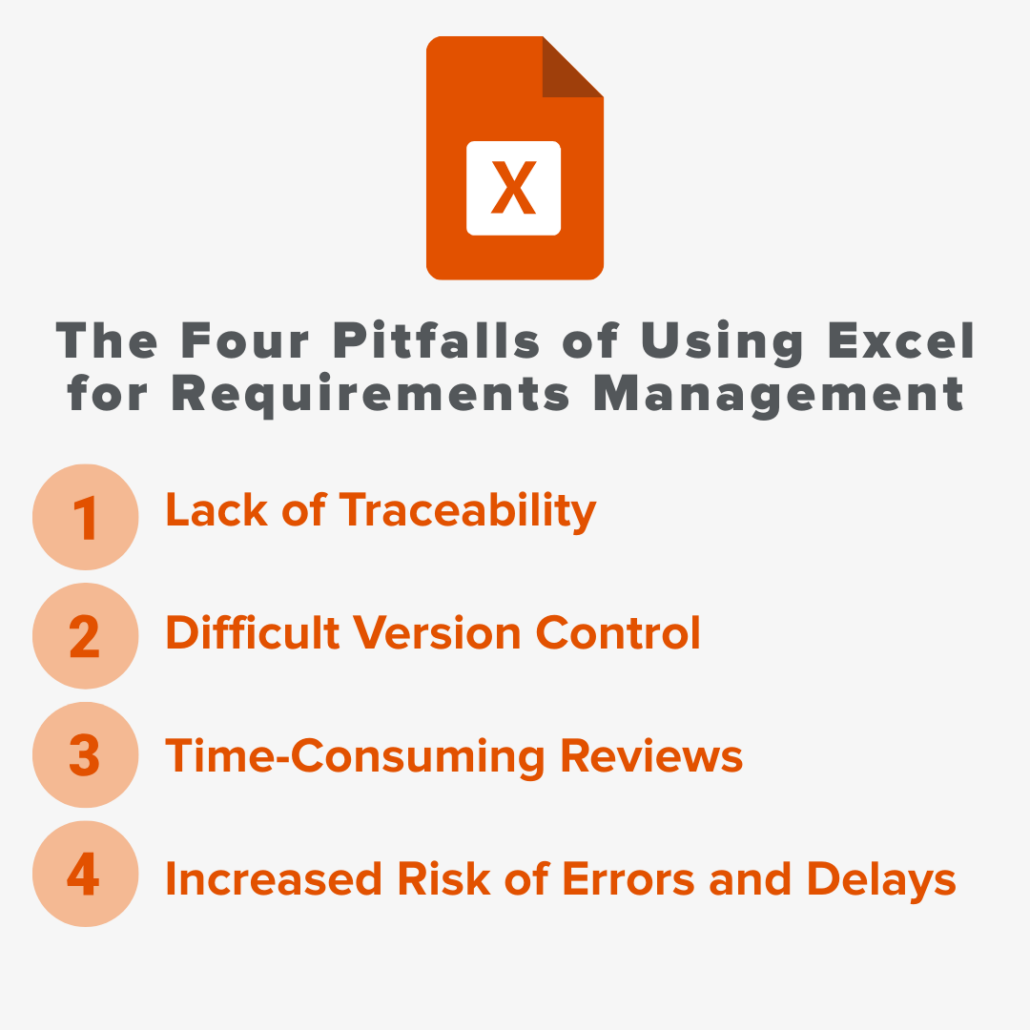
Here are the primary drawbacks of tracking requirements in Excel:
- Lack of Traceability: In Excel, traceability is a manual, retroactive process. Creating and maintaining links between user needs, system requirements, test cases, and risk analysis is time-consuming and highly error-prone. A single missed update can create a critical gap in your documentation, which may go unnoticed until late in the development cycle.
- Difficult Version Control: When multiple team members collaborate on a spreadsheet, it’s easy to lose track of the latest version. Without a formal system for change management, unapproved edits can occur, and the history behind a change is often lost in email chains or meeting notes. This makes it nearly impossible to perform effective impact analysis.
- Time-Consuming Reviews: Circulating a large Excel file for review is inefficient. Stakeholders may be looking at different versions, and consolidating feedback from multiple sources is a tedious, manual task. This leads to long review cycles and pulls engineers away from critical design and development work.
- Increased Risk of Errors and Delays: Manual data entry and maintenance inevitably lead to human error. A broken link in a traceability matrix or an outdated requirement can result in faulty product releases, costly late-stage rework, and failed regulatory audits. As one customer noted, “Every time a requirement changed, it needed to be updated across the whole documentation path. This was not sustainable using Word and Excel, and it was risky.”
RELATED: Transform Engineering Processes: Bridge Gaps Between Teams and Tools Effectively
Ready to Find Out More?
Our team of experts is here to answer any questions and learn how we can help enable your continued success. Get started with a free 30-day trial, or book a demo!
The Alternative: A Data-Driven Approach with Jama Connect
To overcome the limitations of Excel, forward-thinking organizations are adopting modern requirements management solutions. These platforms replace static documents with a dynamic, database-driven approach, creating a single source of truth for all project stakeholders.
Jama Connect is designed specifically to address the challenges systems engineers face in complex product development. It moves teams away from disconnected spreadsheets and toward an integrated environment where requirements, risks, and tests are all connected.
The most important benefit is the shift from manual effort to automated efficiency. Instead of spending hours updating documents, your team can focus on innovation and engineering.
Key Benefits of Jama Connect vs. Excel
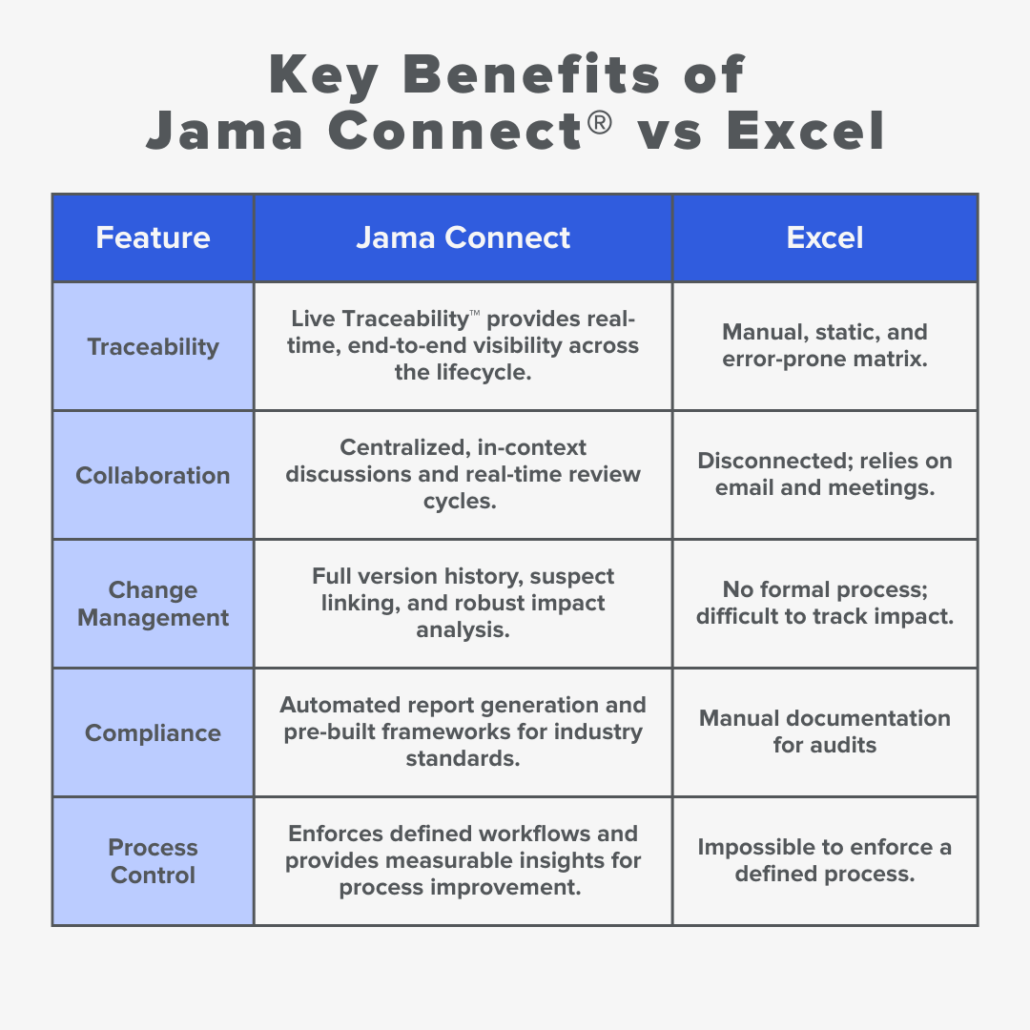
With Jama Connect, systems engineers gain the ability to visualize complex relationships, automate traceability, and manage change with confidence. This ensures that as products evolve, the requirements documentation remains accurate, complete, and compliant.
FAQs: Tracking Requirements in Excel
Q: Is Excel good for requirements management on small projects?
A: Excel can work for very simple projects with a small number of requirements and a small team. However, even on small projects, it lacks the robust traceability and change management features needed to mitigate risk effectively, especially in regulated industries.
Q: What is the biggest risk of using Excel for requirements management?
A: The biggest risk is the lack of reliable traceability. Without a live, automated view of how requirements connect to tests and risks, it is incredibly difficult to assess the impact of a change or prove to auditors that all requirements have been met. This can lead to product recalls, regulatory fines, and significant project delays.
Q: How does a tool like Jama Connect improve traceability compared to an Excel matrix?
A: Built in traceability in Jama Connect automatically creates and maintains relationships between requirements, tests, risks, and other items. Unlike a static Excel matrix that requires manual updates, Jama Connect gives you a real-time, clickable view of your entire project. If a requirement changes, the platform automatically flags all connected items for review, ensuring nothing is missed.
Learn more about Proactive and Live Traceability™ in Jama Connect® vs. Retroactive and Lagging Traceability in Excel in THIS POST.
In This Webinar, Learn Best Practices for Writing Requirements
Book a Demo
See Jama Connect in Action!
Our Jama Connect experts are ready to guide you through a personalized demo, answer your questions, and show you how Jama Connect can help you identify risks, improve cross-team collaboration, and drive faster time to market.